JavaScript PlainDateTime
The Temporal.PlainDateTime Object
The Temporal.PlainDateTime object is a pure date and time object.
It represents a calendar date and a wall-clock time with no time zone.
Example: 2026-05-07T14:30:00.
Example
// Create a PlainDateTime object
const dateTime = Temporal.PlainDateTime.from("2026-05-17T14:30:00");
Try it Yourself »
The T is a literal to separate the date from the time.
What You Should Learn:
- How to use JavaScript Temporal.PlainDateTime
- How to work with date and time without a time zone
- How to add and subtract dates
- How to compare dates safely
PlainDateTime is useful when you need both date and time, but not time zone.
How to Create a PlainDateTime Object
An PlainDateTime object can be created in several different ways:
| From | Code |
|---|---|
| Constructor (new) | new Temporal.PlainDateTime() |
| ISO String | Temporal.PlainDateTime.from() |
| Now (current time) | Temporal.Now.plainDateTimeISO() |
Create a PlainDateTime with new
You can create a PlainDateTime object using the new constructor.
The constructor takes parameters like year, month, day, hours, and minutes.
Example
// Create a PlainDateTime object
const date = new Temporal.PlainDateTime(2026, 5, 17, 14, 30);
Try it Yourself »
In Temporal objects, months start at 1.
In the legacy Date object, months start at 0.
Create a PlainDateTime from a String
You can create a PlainDateTime object from an ISO 8601 / RFC 9557 string.
Example
// Create a PlainDateTime object
const dateTime = Temporal.PlainDateTime.from("2026-05-17T10:00:00");
Try it Yourself »
The T Between Date and Time?
The T is a literal to separate the date from the time.
You should read it as an abbreviation for Time.
It is the separator required by the ISO 8601 format.
Create a PlainDateTime from Now
You can create a PlainDateTime object from current time.
Add or Subtract PlainDateTime
You can safely add or subtract time.
The original value does not change.
Example
// Create a PlainDateTime object
const date = Temporal.PlainDateTime.from("2026-05-17T14:30:00");
// Add and subtract time
const earlier = dateTime.subtract({ minutes: 30 });
const later = dateTime.add({ hours: 2 });
Try it Yourself »
When to Use PlainDateTime
Applications where time zone conversion is not required.
Local event scheduling.
Appointments without international time zone handling.
Forms that collect date and time.
Compare PlainDateTime Values
You can compare PlaneDateTime values using the equals() method.
Example
const d1 = Temporal.PlainDateTime.from("2026-05-17T14:30:00");
const d2 = Temporal.PlainDateTime.from("2026-05-17T14:30:00");
let result = d1.equals(d2)
Try it Yourself »
Most (*) temporal objects have their own equals() method:
- instant.equals(instant)
- plaindate.equals(plaindate)
- plaintime.equals(plaintime)
- plainyearmonth.equals(plainyearmonth)
- plainmonthday.equals(plainmonthday)
- plaindateTime.equals(plaindatetime)
- zoneddateTime.equals(zoneddtatime)
(*) Duration has not.
Learn More:
Convert to ZonedDateTime
A PlainDateTime object does not include time zone information.
You can convert it to a ZonedDateTime if needed.
Example
const dateTime = Temporal.PlainDateTime.from("2026-05-17T10:00:00");
const zoned = dateTime.toZonedDateTime("Europe/Oslo");
Try it Yourself »
Compare PlainDateTime with Other Types
| Type | Meaning |
|---|---|
| Instant | Exact Moment in UTC time |
| PlainDateTime | Plaind Date and Time (No Timezone) |
| ZonedDateTime | Local Date and Time (+ Time Zone) |
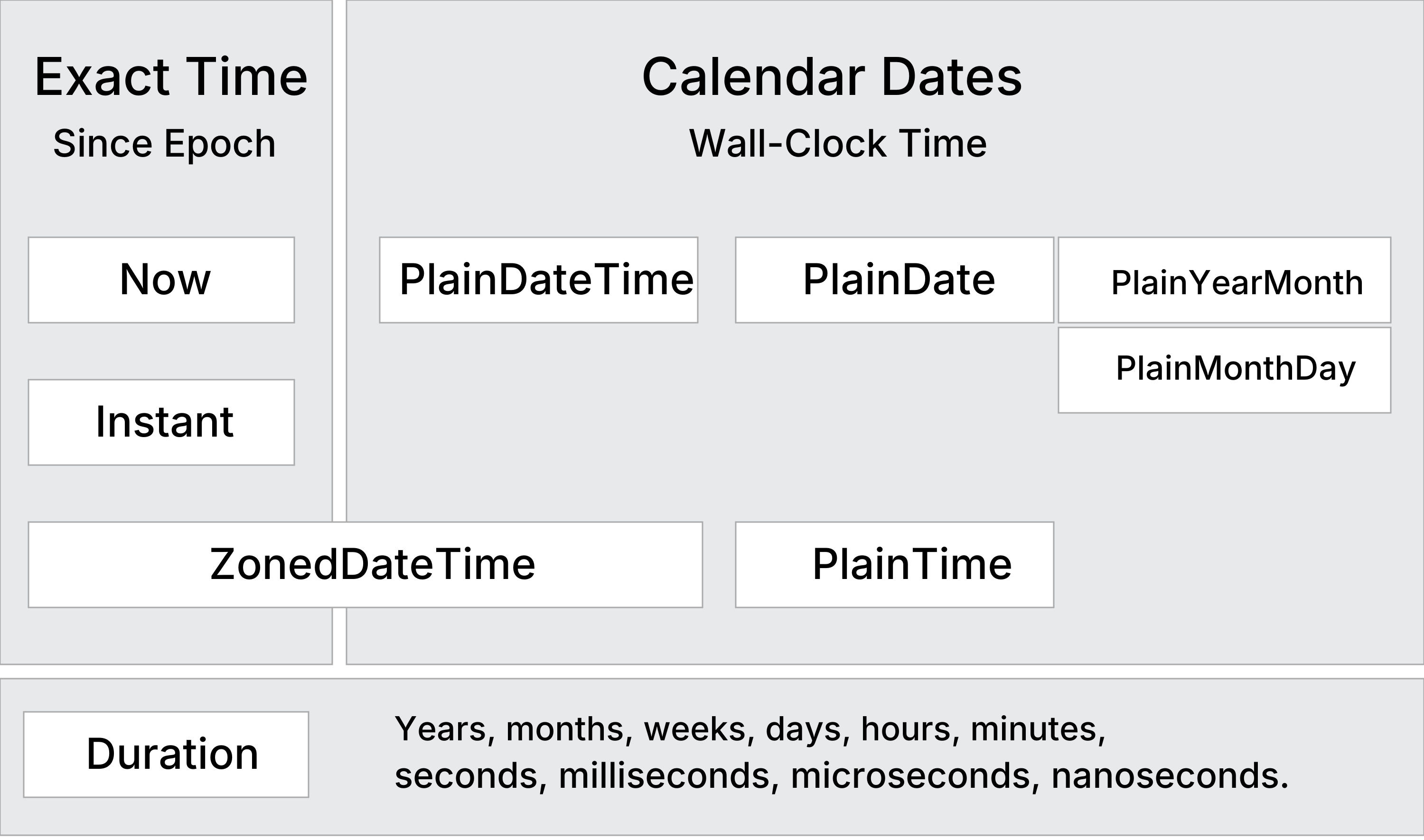
Temporal.PlainDateTime Methods
| Constructing | Description |
|---|---|
| from() | Creates a PlainDateTime object from an object or a string |
| new | Creates a PlainDateTime object from parameters |
| Arithmetic | |
| add() | Returns a PlainDateTime with a duration added |
| subtract() | Returns a PlainDateTime with a duration subtracted |
| round() | Returns a PlainDateTime rounded to a given unit |
| Comparing | |
| compare() | Returns -1, 0, or 1 from comparing two dates |
| equals() | Returns true if two PlainDateTime objects are identical |
| since() | Returns the difference from another PlainDateTime |
| until() | Returns the difference until another PlainDateTime |
| Converting | |
| toPlainDate() | Returns a PlainDate object with the date from this PlainDateTime |
| toPlainTime() | Returns a PlainTime object with the time from this PlainDateTime |
| toZonedDateTime() | Returns a ZonedDatetime object with this PlainDateTime in a time zone |
| with() | Returns a PlainDateTime with specified fields modified |
| withCalendar() | Returns a PlainDateTime with a different calendar system |
| withPlainTime() | Returns a PlainDateTime with the time part replaced by a new time |
| Formatting | |
| toJSON() | Returns an RFC 9557 format string for JSON serialization |
| toLocaleString() | Returns a language-sensitive representation of the date |
| toString() | Returns an RFC 9557 format string representation of the date |
| valueOf() | Throws an error to prevents temporals from being converted to primitives |
Temporal.PlainDateTime Properties
The Temporal.PlainDateTime object has 22 properties of date information.
Display all PlainDateTime PropertiesExample
const date = new Temporal.PlainDateTime(2026, 5, 1, 14, 30);
Try it Yourself »
| Property | Description |
|---|---|
| calendarID | Calendar system identifier ("iso8601") |
| day | The day as an integer (1-31) |
| dayOfWeek | The day of the week as an integer (1 = Monday) |
| dayOfYear | The ordinal day of the year |
| daysInMonth | The total number of days in that month |
| daysInWeek | The total number of days in that week |
| daysInYear | The total number of days in that year |
| era | The era name of the calendar, if applicable ("gregory") |
| eraYear | The year within the era, if applicable |
| hour | The hour as an integer (0-23 |
| inLeapYear | A boolean indicating if the date falls in a leap year |
| microsecond | The microsecond as an integer (0-999) |
| millisecond | The millisecond as an integer (0-999) |
| minute | The minute as an integer (0-59) |
| month | The month as an integer (1-12) |
| monthCode | A calendar-specific string code for the month ("M01") |
| monthsInYear | The total number of months in that year |
| nanosecond | The nanosecond as an integer (0-999) |
| second | The second as an integer (0-59) |
| weekOfYear | The week number within the year |
| year | The year as an integer |
| yearOfWeek | The year that the week belongs to |

